How to Turn One Vlog Into a Week of Short Clips (Without Losing Your Weekend)
How to repurpose long form videos into short form content
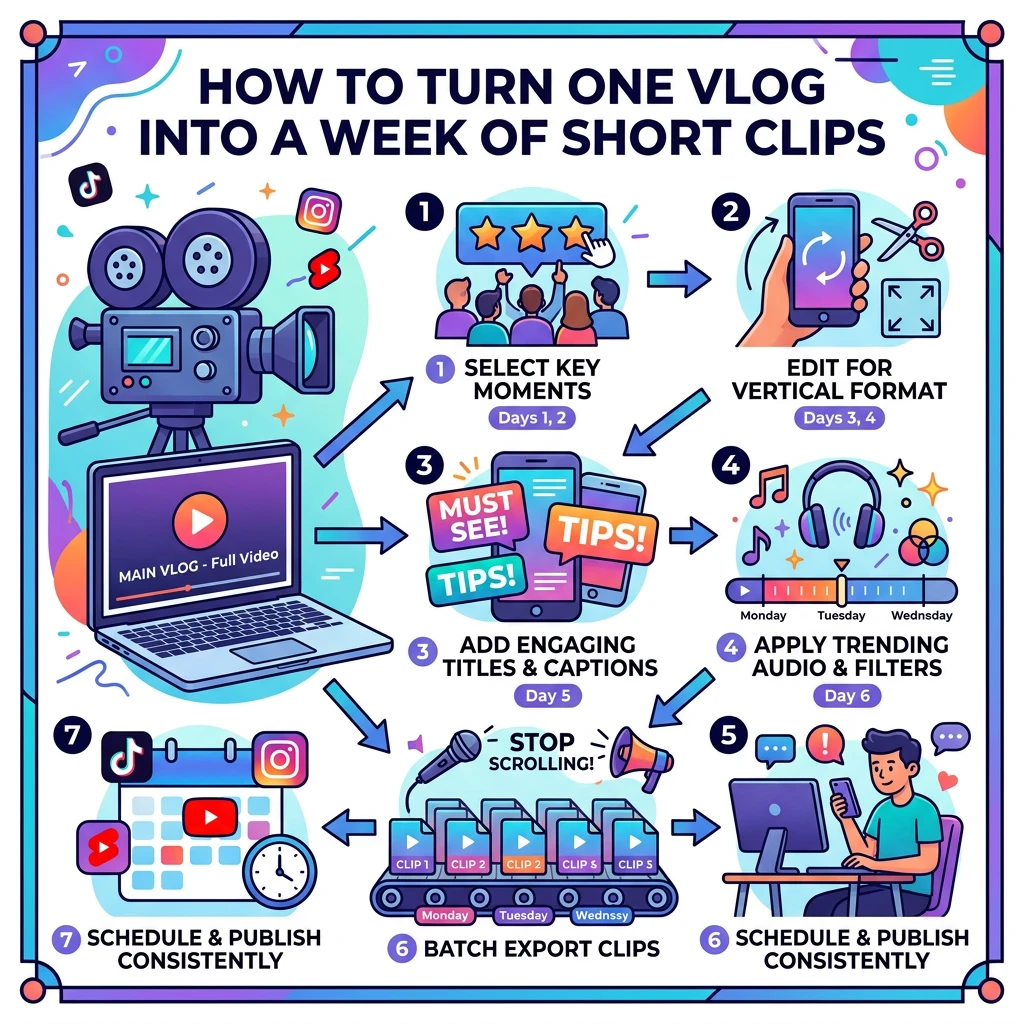
A vlog with a handful of distinct moments gives you enough material for seven short clips, one per day, without filming anything new. The trick is to give each clip a single job before you cut it, so that every post either brings in new viewers, sends them to the full video, or builds toward something you plan to offer later.
This is how to repurpose long form videos into short form content when you would rather spend your weekend outside than re-editing. It is about choosing moments and scheduling them. For the mechanics of cutting, the editing workflow for solo vloggers covers that side.
Can one vlog really feed a whole week of shorts?
Yes, because a long vlog is a pile of small moments held together by a storyline. Viewers who watch the whole thing enjoy the storyline. Viewers scrolling a feed only need one moment, and one moment is all a short has to deliver.
Take a hypothetical 14-minute vlog about a day trip to a seaside town. Somewhere in it you get lost, try an absurdly large ice cream, test a new tripod, and catch a decent sunset. That is four or five separate clips already, and none of them needs the others to make sense.
The week works because each post does something different. If all seven clips were “best bits,” your audience would see the same kind of post seven times and you would learn nothing about which kind works.
Which moments in a long vlog are worth clipping?
Watch your finished vlog once with a notepad and mark any moment that fits one of these:
- A reaction. A laugh, a groan, a face that says everything. Faces carry clips well.
- A small surprise. Something went differently than planned, like a wrong turn or a closed shop.
- A clear opinion. “This tripod is great for X and annoying for Y” is a clip. “It was fine” is not.
- A line you would quote. If you said something sharp or funny, it can open a clip.
- A useful fact or tip. Anything a stranger could use in thirty seconds.
- A pretty shot with a reason. The sunset works if something is happening in it, such as a sentence or a decision.
Skip the moments that only make sense if you saw the previous five minutes. Also skip anything where you are mid-sentence, mid-walk and mid-thought. If you need to explain the clip before it plays, it is not ready to stand alone.
Aim to mark seven to ten candidates. You will drop a few once you see which jobs they can do.
What job should each short do?
Give every clip one job. Five jobs cover nearly everything:
- Hook. Its only purpose is to stop a stranger scrolling and make them follow you. It needs no context and no link, only a strong first second.
- Tease. It shows the setup of a moment and cuts off before the payoff, which lives in the full vlog. Lost in a maze of alleys? Show the wrong turn and end on “so I picked the left one.”
- Review. A short, honest verdict on something you used. It builds the habit of reviewing on camera, which matters if reviews and affiliate links are on your roadmap.
- Link. It points to something specific: the full video, a gear list, a resource page. Today that link might go only to your vlog. Later it can go to affiliate links, a plugin of your own or a sign-up page.
- Invite. It asks viewers to do something: answer a question, suggest the next destination, comment, join your community. This is where you start building an audience that talks back.
One clip, one job. A short that tries to hook, tease, review, link and invite in forty seconds ends up doing none of them well.
How do you turn a moment into a clip that stands alone?
Start on the interesting part. Long vlogs warm up gently, but a short has about one second before the thumb moves on. Trim the lead-in until the clip opens on the laugh, the opinion or the wrong turn.
Then check three things:
- The first line makes sense alone. If it begins with “so anyway,” rewrite it or add a caption that gives context in a few words.
- It has one point. If you can describe the clip in one sentence (“the ice cream was bigger than my head”), it is ready. If you need two sentences, split it into two clips.
- It ends on purpose. A hook can end on the punchline. A tease ends just before the answer. A link clip ends with one clear sentence saying where to go.
Add captions, since plenty of people watch with the sound off. Check the auto-generated text before you post, because software has a talent for turning “tripod” into something unfortunate.
What does a seven day posting plan look like with a real example?
Here is the seaside vlog from earlier, scheduled across a week. The vlog itself is a made-up example, but the plan applies to any long video you publish.
Day Job The clip Where it points Monday Hook The ice cream reveal, 15 seconds, opening on the reaction Follow for more Tuesday Tease Getting lost, cut off just before the way out “Full story in the vlog” Wednesday Review Thirty seconds of honest tripod verdict: one good point, one annoying one Full vlog for the test footage Thursday Hook A second funny moment, different from Monday’s Follow for more Friday Link “Everything I packed for the day trip,” a simple list Description or bio link to the vlog or a gear list Saturday Invite A question to camera: “Which town should I visit next?” Comments Sunday Tease A fifteen second preview of next week’s vlog Subscribe so you don’t miss it
Notice that two of the seven days are hooks, two are teases, and the rest each do one different job. The mix keeps the feed from feeling like one repeated ad. It also gives you a comparison: if Monday’s hook gets far more views than Thursday’s, that tells you what kind of moment your viewers like.
Post at the same time each day if you can. Consistency is easier on your audience, and it is easier on you when the posts are already scheduled.
How do you automate the boring parts and keep the fun parts?
The fun parts are picking the moments, writing the first line, and replying to people who comment. Keep those for yourself. Everything else can be batched.
- Cut all seven in one sitting. Switching between “editor mode” and “everyday mode” every day costs more time than doing it once.
- Schedule the uploads. Most platforms and scheduling tools let you set a date and time in advance, so Monday you can spend the whole weekend away from your phone.
- Keep a caption bank. Save a few reusable lines for common endings, such as “full vlog on my channel” or “tell me where next.” Then edit them for each clip instead of starting from a blank box.
- Use a simple tracker. A spreadsheet with columns for day, job, clip, post time and result is enough.
- Let captions generate automatically, then proofread them.
Leave the replies unscheduled. A comment answered within the hour reads like a person; one answered three days later reads like a chore.
How do shorts point toward reviews, affiliate links and a future membership?
Your income streams are not live yet, which is the best time to practice. Each clip job trains a habit that you will use later:
- Review clips build an archive of honest opinions. When you add affiliate links, you will already have a record of reviewing things the way you actually think about them. Disclose any affiliate relationship clearly once you have one.
- Link clips teach your viewers to follow a link from a short to something you made. Right now that destination is your vlog. Later it can be a recommended gear page or a product of your own, such as a plugin.
- Invite clips show you what people want more of. The answers to “which town next?” are also market research for what a membership could include.
If you are thinking about the longer path, turning casual viewers into paying members goes deeper on that side. For now, the short-form job is simpler: collect people who like you, and make it easy for them to find the rest of your work.
Which numbers tell you a clip is working, and what do you change next week?
You do not need a dashboard full of metrics. Look at four numbers per clip:
- How many people watched past the first few seconds. A low number means the opening is weak. Change the first line or start the clip later.
- Average watch time compared with clip length. If people leave halfway, the clip is probably too long or has two ideas. Split it or trim it.
- Clicks or visits to your full vlog. Tease and link clips are judged on this number, not on views. If a tease gets views but no clicks, the cutoff point was too soft. End closer to the payoff.
- Comments and follows. Invite and hook clips are judged here. If nobody answers your question, ask something easier, such as a choice between two options.
Judge each clip by its job, not by raw views alone. A review clip with modest views and a lot of thoughtful comments may be worth more than a hook that went wide and got no follows. For help reading the data, there is a guide to the five vlog analytics numbers that matter.
After one week, make a single change. Swap one hook for a different kind of moment, or tighten one tease. Changing one thing at a time means you know what caused the difference.
Share your favourite short
Now it is your turn. Drop a link in the comments to your favourite short clip cut from one of your long vlogs, so other vloggers can find you and watch. Tell us which job it was doing, and we will all take notes… preferably with coffee ☕