Effective Storyboarding For Vlogs
Vlogging might look simple at first glance, but there’s a lot that goes into making videos that are engaging and easy to follow. One thing I’ve learned is that effective storyboarding can make or break a vlog. Without a clear plan, it’s easy to forget important shots, run into editing headaches, or lose track of your story halfway through filming.
When I started creating vlogs, I often found myself shooting random footage and hoping I could piece everything together later. That approach left me frustrated and spending way too much time editing. Once I started using storyboards to organize my ideas, my vlogs became more organized, my filming days went smoother, and my final videos were a lot more enjoyable to watch.
In this guide, I’m going to walk you through how I approach storyboarding for vlogs. With a bit of planning, you’ll be able to bring your creative ideas to life and speed up your editing process. Whether you’re a beginner or want to improve your vlogs, storyboarding is a simple tool that really pays off. Let’s check out how it works!
Clarify Your Vlog’s Purpose and Structure
Every good storyboard starts with a simple question: what’s the main goal of this vlog? Am I sharing a travel experience, teaching a DIY skill, or documenting a fun day with friends? Knowing the main outcome helps shape every shot and scene you plan.
Questions I Always Ask First:
- What is the core message or story I want viewers to take away?
- Who is my main audience, and what do they enjoy seeing?
- Are there key locations or moments that need to be included?
Once I have answers to these questions, I break my vlog down into clear sections. For example, a typical travel vlog for me might have an intro, a segment on getting to the location, activities I want to highlight, and a closing reflection. With this structure in mind, it’s much easier to start sketching a draft storyboard.
Thinking ahead also helps me spot potential challenges. For example, if I know I’ll be outdoors, I might plan backup shots in case the weather doesn’t cooperate. Taking a moment to think about each section makes filming and editing more manageable, and ensures I don’t miss key moments or visuals that will really connect with my viewers.
Map Out the Main Scenes
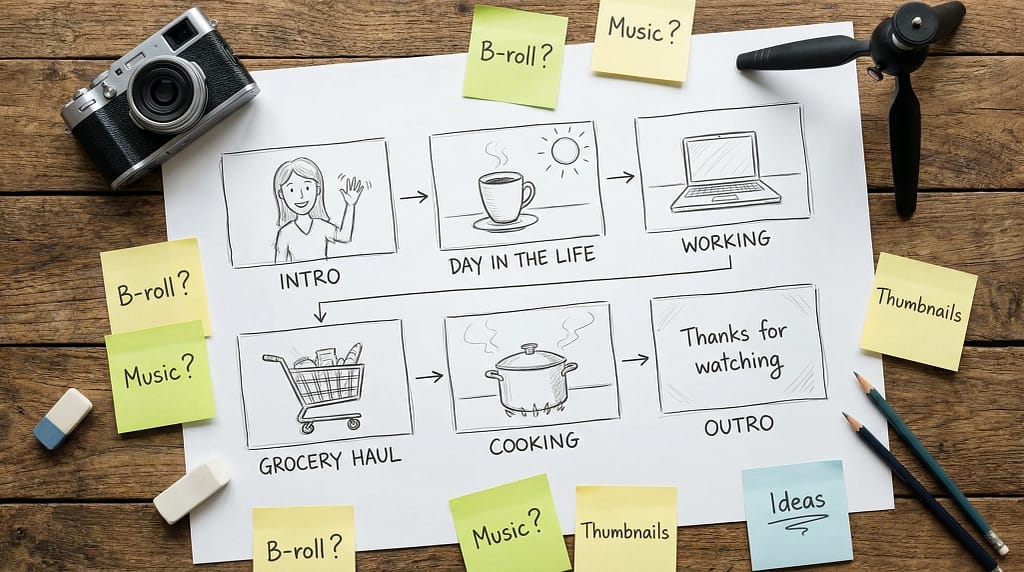
Storyboarding doesn’t always mean detailed sketches. Sometimes, I just draw simple boxes with stick figures or quick notes describing what happens in each scene. The point is to lay out a roadmap that follows the flow I want in my final video.
Elements I Include for Each Scene:
- Scene Description: What will be happening in this scene?
- Location: Where do I need to film?
- Key Shots: What angles or camera movements will work best?
- Audio Needs: Will I talk to the camera, add voiceover later, or use music?
For example, if the vlog’s about making homemade pizza, I’ll plan for a wide shot of the kitchen as the opener, closeups for ingredients, and a timelapse for the dough rising. These notes keep me focused and help me remember to get all the footage I’ll need during filming.
Example Vlog Structure:
- Opening: Quick intro and stating the goal of the video.
- Main Content: Step-by-step process, interesting events, or key experiences.
- B-Roll: Cutaway shots, closeups, or scenery to add depth.
- Wrap Up: Personal thoughts, thank yous, or call to action.
Having this scene breakdown in my storyboard saves a lot of time both during filming and when I’m editing later on. It sets a clear path and lets each part of my story build on the last.
Pick the Right Shots and Angles
Camera angles and shot styles have a big impact on how my story comes across. Through my own experience, I’ve found that mixing up wide shots, closeups, and movement shots keeps my vlogs interesting. My storyboard acts as a reminder to switch angles and avoid falling into a pattern of too many similar shots.
Shot Types I Often Plan For:
- Wide Shots: Set the scene and show the environment.
- Medium Shots: Focus on people or key activities.
- Closeups: Highlight important details or reactions.
- POV Shots: Create a sense of being there by filming from my own perspective.
- Movement Shots: Walking, incar scenes, or using a gimbal for smooth motion.
Even a quick shot list in my storyboard, such as “wide shot entrance, closeup hands mixing ingredients, timelapse oven bake,” helps me spot places where I can get creative.
I always try to add variety to my vlogs visually. Sometimes, I’ll insert a quick topdown view or experiment with slow motion for dramatic effect. Planning these ahead in my storyboard gives me more footage to work with and keeps viewers interested throughout the video.
Plan Transitions and B-Roll
Transitions hold the story together. I think about how I’ll move from one scene to the next. Will I use a simple fade, a timelapse, or a quick intro animation? For B-roll, I make a separate section in my storyboard with a list of visuals to capture, items like scenery shots, crowd footage, or closeups of hands working. These small clips fill gaps and smooth out rough edits in postproduction.
B-Roll Ideas That Work Well:
- Plants or decor shots to set the mood
- People laughing or reacting in the background
- Quick pans across the workspace
- Weather or cityscape cutaways
Having a B-roll checklist in my storyboard has saved me from realizing after filming that I missed an easy way to make my videos feel more vibrant and polished.
B-roll can also help if you stumble upon an unexpected moment or want to cover up an awkward transition. Even short clips collected on location make it easier to edit later and step up the overall quality of the vlog.
Make the Most of Visual Storytelling
Vlogging is about sharing an experience. My storyboard helps me focus on visual ways to show what’s happening instead of just talking to the camera. I might sketch out a sequence where a character silently prepares for a big event, using quick shots of facial expressions, hands fidgeting, or a clock on the wall. This planning helps me tell a story without needing to explain every moment with words.
Adding visual cues and planning ahead for creative transitions makes my vlogs much more enjoyable to watch. It also gives me flexibility when something unexpected happens during shooting because I have a structure to return to. If my plan changes on the fly, I can look at my storyboard and adjust without losing the plot. This keeps my vlogs feeling genuine and focused, and makes editing much easier.
Tips For Creating Your Storyboard
I always remind myself to keep things simple. My storyboards aren’t works of art. Sometimes, I use free templates, digital drawing tools, or even plain paper and a pencil. The goal is to clearly show what I want to film, not to waste time making perfect sketches.
What Works Best For Me:
- Quickly sketch out each scene box by box, even if it’s just stick figures.
- Write short descriptions or add arrows to show any movement or transitions.
- If filming with others, I share the storyboard in a group chat so everyone knows the plan.
- Leave space for extra shots that come up during filming.
The more I storyboard, the easier it is to shoot and edit my vlogs with confidence. I encourage experimenting with different tools—there’s no right or wrong way as long as your ideas are organized and the storyboard helps you stay on track during production.
Common Questions & Troubleshooting
What if I run out of ideas while storyboarding?
I step away for a bit or watch vlogs I admire for inspiration. I also ask friends for feedback on my draft storyboard. Sometimes, brainstorming with someone else makes new ideas pop up in surprising ways.
Do I need fancy storyboarding software?
No, I usually stick with paper or free online templates. The important thing is clarity; whatever tool helps you stay organized is the right one. Don’t let tools distract from your creative process.
How much detail should my storyboard include?
I strike a balance between enough notes so I don’t forget any ideas, but not so detailed that I slow myself down. If I know my location well, I keep it simple. For new places, I add more details about shots and movements. Remember, your storyboard is a guide, not a strict script.
My Action Plan For Storyboarding Vlogs
Using storyboards has made my vlogging process much more fun and less stressful. When I take time to plan, my stories flow better, and filming feels more relaxed. Here’s my go-to checklist for effective vlog storyboarding:
- Decide the main message and audience for the vlog.
- Break the story down into clear, simple sections.
- Sketch out or jot down each scene, including key shots and any planned transitions.
- List B-roll shots I want to get while on location.
- Stay flexible in case new ideas or unexpected moments come up during filming.
Storyboarding might seem like an extra step, but it’s really important for turning vlog ideas into smooth, watchable videos. If you have a favorite way to storyboard your vlogs, I’d love to hear your tips. Sticking with this approach helps you make better videos with less hassle—and most of all, keeps the process enjoyable and creative from start to finish.
The Vlog Script Assistant GPT
I specialize in scripting for vlogs, focusing on simplicity and creativity.