Hidden Vlogging Gems
Vlogging has exploded over the past decade, but sometimes it feels like everyone’s got the same camera and the same set of tips. The truth is, there are a bunch of underrated tools and clever ideas out there that can really shake up your videos without breaking the bank. I’ve spent a fair bit of time testing quirky accessories, checking out unusual gear, and finding littleknown spaces on the web where vlogging magic can happen. If you’re into bringing something fresh and authentic to your channel, you’ll want to check out these hidden vlogging gems.
Surprising Gear for Standout Vlogs
Most vloggers reach for the usual tripods, ring lights, and classic shotgun mics. That stuff works, but digging a little deeper can lead to some pretty cool results. Using less conventional tools is one way I’ve been able to give my videos a boost, both in quality and in style.
The world of vlogging equipment is growing fast, and sometimes brands offer features aimed at niche creators or mobile filmmakers. Some of these gems fly under the radar and can offer big value.
Trying out lesserknown gear also helps you develop your own style rather than just copying what’s standard. You might find a new workflow or an easy hack that cuts hours off your editing time. Here are some hidden tools I’d recommend keeping an eye out for:
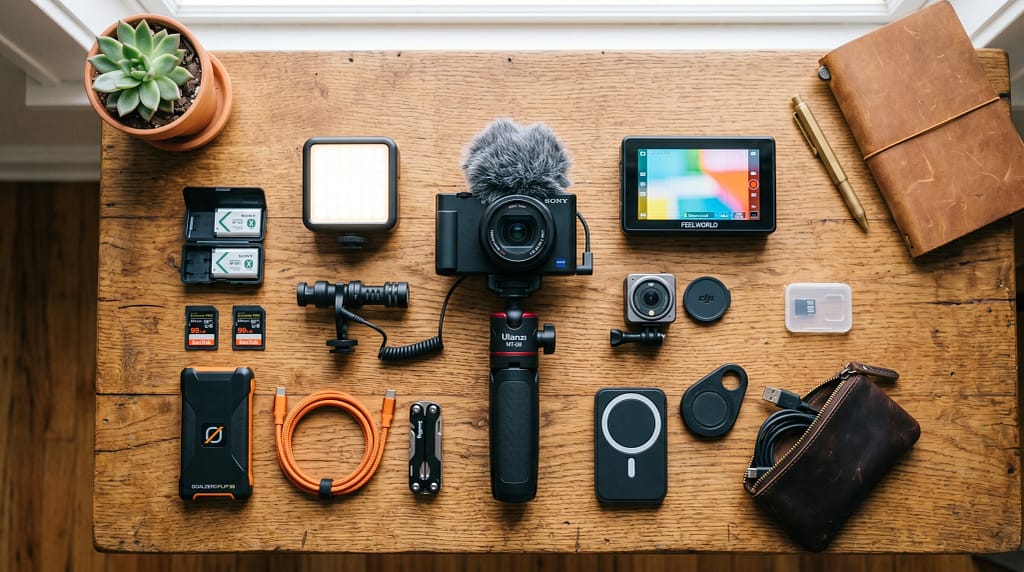
- Mini RGB LED Panels: Compact, batterypowered lights with adjustable colors let you change up your setting’s vibe in seconds. Super useful for quick “mood” changes or hiding bad lighting in awkward corners.
- Clipon Audio Recorders: Lapel mics and tiny wireless recorders, like the Tascam DR10L or Saramonic Blink, deliver great audio without a lot of fuss or visible wires.
- Magnetic Mounting Systems: Mount an action camera or microphone almost anywhere, instantly. These are a huge help when you film in tight spaces, cars, or outdoors.
- Portable Green Screens: Foldable, popup green screens make it easy to use chroma key effects without needing to convert your whole room.
Off the-Path Filming Environments
Location matters almost as much as gear. It’s easy to forget how much a fresh environment can bring a new spark to your videos. I’ve found some of my favorite shots by shooting in settings most folks skip over, such as tuckedaway alleyways, botanical gardens, or offhour laundromats.
Vloggers often stick to their bedrooms or studios, but mixing it up can help viewers stay engaged. Keep an eye out for quiet public spaces, hidden rooftops (with permission), or unique community centers. Even something as simple as a stairwell with bright murals or a city’s undtheradar park can make all the difference.
- Libraries and Bookstores: These places often have charming corners, interesting lighting, and a calm vibe. Always ask for permission first.
- Small Local Cafés: Avoid chains. Independent spots often have quirky décor and more flexible rules for filming.
- Creative CoWorking Spaces: Some spaces allow afterhours rentals or special arrangements for content creators.
- Abandoned or Repurposed Buildings: For dramatic or moody shots, these spots are full of character. Just make sure it’s safe and legal to enter.
Hidden Creative Techniques Worth Trying
Every vlogger covers the basics, like steady shots and good sound. But experimenting with simple, lesserknown creative techniques can really set your channel apart. It’s not about chasing trends but about adding your own vision to common ideas.
- Incamera Transitions: Whip pans, match cuts, and using everyday objects for natural scene changes. It takes some practice but keeps edits dynamic and fun to watch.
- Sound Layering: Mixing in subtle ambient sounds, original music, or vocal effects gives your videos depth. Using apps like Audio Director or GarageBand can make this easier than you’d expect.
- Manual Focus and Pulls: Most vloggers rely on autofocus, but deliberately shifting focus adds a pro touch, especially for storytelling moments.
- StopMotion Inserts: Quick stopmotion clips using only your phone camera can break up talkinghead segments and tell little stories.
Budget Friendly Upgrades No One Talks About
It’s easy to feel like you have to drop a ton of cash to upgrade your channel. I’ve learned that investing smartly, sometimes in offbrand or multiuse products, goes a long way. Some brands offer solid tech without the big name markup. Here are a few pieces that have made a big impact on my workflow:
- Economy OnCamera Screens: Budgetfriendly external monitors (like those from Feelworld) make framing shots way easier, especially for solo runandgun vlogging.
- Modular Grips and Handles: Aftermarket handles that attach to tripods or phone cages let you get smooth, creative angles with almost any device.
- Secondhand Audio Gear: Gently used audio recorders from forums or resale sites can sound just as good as freshfromthebox mics at a big discount.
- DIY Diffusers: Using tracing paper or even a shower curtain to soften harsh lights doesn’t cost much but makes a big difference in how professional your footage looks.
Smart Workflow Helpers Most Vloggers Miss
Staying organized might not be glamorous, but it definitely saves time and gives a boost to productivity. Using some undtheradar digital tools or accessories can make editing, archiving, and even brainstorming a lot less stressful.
- Cheap SSD Drives for Offloading Footage: Don’t lose time (or footage) to old, slow hard drives. There are affordable SSDs out there that massively speed up transfers and backups.
- VoicetoText Note Apps: Tools like Otter.ai or Notion’s builtin recording features are perfect for scribbling down ideas or making quick scripts on the go.
- Automated BRoll Libraries: Websites like Pexels and Mixkit offer royaltyfree video clips that you can use to fill in gaps or illustrate stories without having to reshoot everything yourself.
- Charging Organizers: Portable charging stations for all your small gear (mics, lights, recorders) mean no more lastminute failures midshoot.
Common Challenges and How to Beat Them
Trying new gadgets and ideas isn’t always smooth sailing. I’ve hit plenty of speed bumps with unfamiliar setups, or by trying to shoot in weird locations. Here’s what I’ve learned:
- Tech Compatibility Issues: Always doublecheck that that cool new mic or light actually works with your phone or camera. Adapter cables or firmware updates are sometimes needed, and worth getting ahead of time.
- Battery Stress: Smaller, lessknown brands can sometimes have short battery life. Carry a power bank or USB charging brick for longer outings.
- Background Distractions: When shooting in public or unique spots, you’ll probably run into noise or clutter. Portable sound blankets or foam squares help with audio, and slight camera adjustments can keep the focus on you.
- Permission and Privacy: Always get the green light before filming in someone’s business, garden, or private building. A simple courteous ask can open doors and help avoid awkward moments.
Get Creative Without Breaking Rules
It’s tempting to grab shots wherever inspiration strikes, but respecting property and privacy is really important. I usually carry business cards for my channel and politely explain what I’m doing to owners or staff. This leads to way more “yes” responses than sneaking around.
Tune Your Workflow for Consistency
One of the biggest lessons I’ve picked up is that consistency matters more than having perfection on day one. Making the most of tools that automate or simplify your process frees up time to focus on actual storymaking. Even a simple checklist on your phone—batteries charged, memory cards cleared, permits sorted—makes a difference when vlogging outside your usual space.
Quickfire Advanced Tips for Standing Out
Once you’re comfortable, it’s worth experimenting beyond the basics. Here are a few advanced (but still hidden) tricks that might give you an edge:
- Mirrorless Cameras with Hidden Webcam Mode: Some cameras like certain Sony or Canon models have secret “webcam” functions. This lets you livestream in superb quality without extra gear. It’s worth checking your model’s manual for covered features.
- ND Filters for Smartphones: Adding a neutral density filter immediately ups your outdoor footage, especially on bright days. No more washedout shots.
- Wireless Multidevice Control: Some apps let you control your phone camera or action cam from your smartwatch, freeing up your hands and adding a new level of spontaneity.
- Creative Story Boards with Free Apps: Storyboarder and Canva help plan sequences, so you film fast and skip unnecessary takes. This makes editing a lot easier too.
Frequently Asked Questions on Hidden Vlogging Gems
Below are a few questions I get a lot when chatting with new creators or anyone looking to shake up their vlogging style.
Question: Where can I find these lesserknown gadgets?
Answer: Scour specialty camera stores (both online and local), forums like r/videography, and even crowdfunding platforms like Kickstarter. Sometimes indie brands with awesome features pop up first on these sites.
Question: Are budget alternatives reliable?
Answer: Many offbrand gadgets work perfectly well, just look for real user reviews and test your gear before you need to rely on it. I’ve had great luck with “prosumer” lines from smaller companies.
Question: What’s the best trick for avoiding burnout and staying inspired?
Answer: Rotate your locations, experiment with editing styles, or challenge yourself to use only one new tool each week. Keeps things fun and fresh.
Bring Your Vlogs to Life with Hidden Gems
Even in a world where everyone seems to be vlogging, littleknown gadgets, creative filming spaces, and smart workflow helpers can make your channel punch far above its weight. It’s really about having fun with your tools, searching for new perspectives, and building routines that let you stay creative. Explore what’s out there; you might just find your new favorite way to tell stories on camera.
The Vlog Script Assistant GPT
I specialize in scripting for vlogs, focusing on simplicity and creativity.