Vlogging Challenges And Solutions
Jumping into the world of vlogging can feel both exciting and a bit daunting. Sharing your story, giving tips, or capturing daily life on camera opens up a creative outlet. There’s a learning curve that often catches new vloggers off-guard. I’ve run into plenty of snags on my own vlogging adventure, and I know I’m not alone. Here, I’ll break down the common challenges most vloggers face and share some practical answers so you can move past the hurdles and keep having fun on your channel.
Common Vlogging Challenges to Watch For
Vlogging has exploded over the past decade, thanks to how easy it is to shoot, edit, and upload video right from home. You don’t need a fancy studio to start, but there are some real roadblocks that trip up both beginners and even those with a few uploads under their belts. Owning a camera doesn’t prepare you for awkward stares while filming in public, editing marathons, or the shock of hearing your own voice back. Plenty of vloggers burn out before their channels really get off the ground because of hurdles like these.
Most of these bumps don’t show up in the highlight reels. If you want to stick with it and build something you’re proud of, knowing what to expect (and how to handle it) can smooth your path a lot. Below, I dig into a handful of challenges that come up often, so you can recognize and manage them before they ruin your creative streak.
Get Started ? Practical Obstacles and Solutions
Brand new vloggers tend to face a mix of technical issues, performance jitters, and a ton of questions about what’s worth posting. Here’s a rundown of common problems and some solutions I’ve picked up along the way:
- Camera Shyness: Talking to a lens can feel odd, especially in front of strangers. Practicing short takes privately before going live is super useful. I started with casual chats in my room, no pressure and no audience, just to get used to my own voice and style.
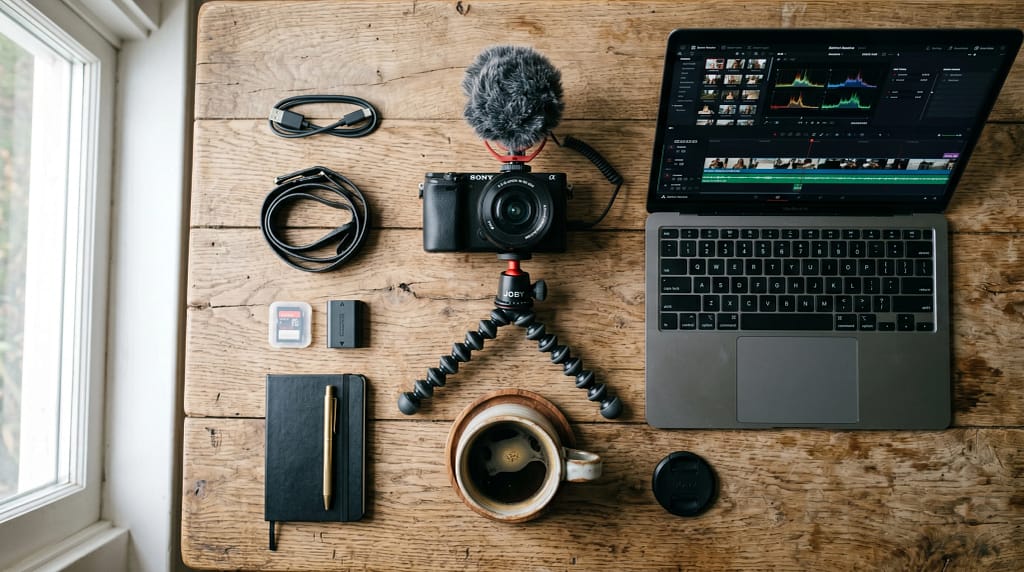
- Choosing the Right Gear: It’s easy to overthink equipment. Start simple, your smartphone works fine. If and when you want to step up, look for cameras with reliable autofocus and decent microphones. There’s no need to spend huge money until you know vlogging is right for you.
- Figuring Out Editing Software: Editing is where a lot of people get tangled up. Free tools like iMovie, DaVinci Resolve, or Shotcut have all the basics for trimming and pacing. Keep edits clean when you’re new. Just cut out ums, awkward silences, and pauses for a faster video.
- Staying Consistent: Burnout and time management are real. Planning a realistic upload schedule, like one post per week or every other week, helps. Batch-filming on weekends is another trick to stay ahead.
Quick Guide to Solve Common Vlogging Roadblocks
There’s no single fix for vlogging problems, but here are some clear steps you can try if you’re stuck:
- Practice in Private: Film yourself talking about everyday stuff before publishing anything. This gets you used to both the camera and the editing process.
- Find Your Format: Try different types of vlogs, like daily diaries, tutorials, or review videos, to see what feels most natural. Don’t lock in a theme until you’ve experimented a little.
- Use a Simple Editing Template: Create a basic intro and outro. Editing future videos gets much easier when you reuse these pieces, plus your channel starts to feel like a brand.
- Work With What You Have: Whether your phone or a basic DSLR, good lighting and clear audio matter much more than having the latest gear. Pick a quiet spot with plenty of daylight for your early videos.
- Stay Patient With Growth: Views and subscribers build slowly. Focusing on steady improvement over quick numbers keeps frustration low in those first few months.
Combining these tips with some regular practice goes a long way. Even the biggest creators got their start by simply posting, refining, and sticking with it. Consistency and persistence are key, and embracing the learning process will help you grow.
What to Consider Before You Hit Record
Aside from gear and nerves, every vlogger faces “behind-the-scenes” complications that aren’t always obvious before you begin. Tackling these early can help you avoid big headaches down the road:
- Lighting and Sound Quality: A dim, echoey video can turn off viewers, no matter how eye-catching your content is. I got a big boost in quality and watch time just by filming near a window and picking up a cheap clip-on mic. Background noise (like dishwashers, fans, or open windows) can sneak into your videos, so check your surroundings before filming.
- Legal and Copyright Issues: Using music or clips you don’t own is risky. Platforms can mute, demonetize, or delete your content. There are tons of free music libraries (like YouTube’s audio library) that are totally safe for vlogs.
- Negative Comments: Criticism and trolls come with public videos. Deciding how you’ll handle nasty feedback in advance (ignore, delete, or politely respond) can keep things from feeling personal.
- Privacy and Oversharing: Once something is online, it’s hard to take back. I always double-check for revealing info like addresses and kids’ schools before posting anything I shoot outdoors or at home.
Lighting and Sound Upgrades
Good lighting and sound both make big improvements in watchability. You don’t need to buy fancy lights. A desk lamp with a sheet over it can soften shadows. For audio, inexpensive lavalier mics that plug into your phone help a lot, especially for walk and talks or outdoor shoots. Pay attention to your space and use pillows, rugs, or curtains to help control echoes for a clearer sound.
Respect Copyright, and Your Privacy
Most new vloggers don’t realize background TV shows, songs, or even random people walking by can cause copyright or privacy headaches. I use royalty free background music and blur faces or license plates whenever possible. Thinking about these details ahead saves a bunch of problems later. As an extra tip, check your video before uploading to make sure there’s nothing personal in the background—a quick double-check can save you from unintended info leaks.
Level Up with these Tricks for Smoother Vlogging
Once filming and editing get easier, you’ll probably want to take your content up a notch without spending a ton. Here are some ways I’ve found to upgrade the look and feel of my vlogs:
Try B-Roll: B-roll is extra footage you layer over your main talking scenes, like closeups of what you’re talking about or shots of you setting up your camera. It covers cuts or awkward transitions and keeps viewers interested.
Learn Basic Color Grading: Even simple color tweaks can make videos feel more lively. Tools like Adobe Premiere Rush or even free apps have auto-correct features to boost colors without much tweaking.
Create Playlists and Series: Organizing your videos into playlists helps returning viewers binge related content. Plus, it keeps your channel looking put together and organized as your library grows.
Team Up With Others: Collaborating for a shared vlog or challenge exposes your channel to new audiences and keeps recording fun. This can be as easy as a video call or trading clips with another creator.
These steps make your workflow smoother, and your videos more engaging over time. Every step you take, from experimenting with soundtracks to working with new creators, adds depth and polish to your channel.
Real-Life Examples? How Vloggers Overcome Challenges
Many successful vloggers have had to work through these same issues. For example, travel vloggers often film in unpredictable conditions, so they keep their setups minimal and their gear lightweight. Tech reviewers usually plan detailed scripts to avoid rambling or missing key points, which makes editing a lot easier. Lifestyle and daily vloggers batch content when energy is high and schedule off days to keep from burning out. None of them get it perfect every time, but persistence and small tweaks after each post add up to big improvements over time.
- Travel Vlogs: Compact tripods, backup batteries, and spare SD cards go everywhere in case equipment fails or days run long. Because of changing locations, these vloggers also scout spots ahead and research basic rules or permits needed to film in certain places.
- Product Reviews: Ring lights and uncluttered backgrounds help the product stand out, and having a checklist keeps videos on track. Reviewers often draft an outline before recording and summarize their thoughts honestly for higher credibility with their audience.
- Family or Day in the Life Channels: Using soft background music and time lapses helps maintain privacy while adding interest to daily footage. Keeping segments concise and shooting extra footage means they can create engaging stories without overexposing personal details.
Frequently Asked Vlogging Questions
I get a lot of questions from those just starting, so here are some quick answers to help you get set up:
Question: What’s the best first camera for vlogging?
Answer: Many smartphones have great cameras and are more than enough for starting. If you want to upgrade, look for a camera with a flip screen and an external mic input for better audio.
Question: How do I get over being awkward on camera?
Answer: Record yourself talking to the camera without the intention of uploading. Over time you’ll start to feel more natural, and your personality will shine through. Practice regularly and try watching vlogs that inspire you—see how your favorite creators act comfortable and authentic, and learn from their style.
Question: How often should I upload?
Answer: Figure out a schedule you can realistically keep up with, whether that’s weekly or biweekly. Consistency keeps viewers coming back and helps you improve faster.
Bring It All Together, Stay Motivated and Grow
Vlogging pays off when you stick with it long enough to see progress in both your videos and your confidence. Remember, even the best creators started out with rough cuts and a little stage fright. Focusing on small improvements, trying new ideas, and connecting with your audience will help keep the process fun instead of stressful. The best stories come from real experiences, so don’t be afraid to show what works and what doesn’t along the way.
Whether you’re sharing travel stories, tech reviews, or sneak peeks of everyday life, vlogging is all about learning on the go. Set up your camera, hit record, and enjoy the ride!
The melody maker GPT
Translates text and images into music with download files.

Camera lenses on Amazon
Zoom lenses on Amazon
best vlogging editing software on amazon
best vlogging microphone on amazon
Best vlogging tripod on Amazon
Best vlogger cameras on Amazon